Posts

Showing posts with the label Apex

Salesforce Fact #976 | External service issue in apex

While referencing the external services in apex, we might encounter error like: Dependent class is invalid and needs recompilation: Class ExternalService.MyCallout : Unexpected token '2'. This is a known issue. The workaround is to replace '2XX' with '200' in the JSON of external service. Reference:  https://help.salesforce.com/s/issue?id=a028c00000uW9g4

Salesforce Fact #957 | Password reset of new user using apex

For new users, we can use the System.setPassword() method to set a password and while logging in they would be prompted to set a new password as per the standard salesforce behavior. However, clicking on cancel would bypass that and would login to the org. This is helpful while creating multiple test users in bulk and to have same password for all instead of manually setting it for each user. Reference:  https://salesforce.stackexchange.com/questions/83345/how-do-i-create-a-user-without-asking-them-to-set-their-password

Salesforce Fact #948 | Prevent login using Transaction Security Policy

Image
We can use transaction security policy to prevent multiple users from logging into Salesforce. To implement this, we use the LoginEvent, an apex class and custom permission set. In this example, we have created a permission set 'Prevent Login PS' and in the apex class we are checking whether the user is assigned the PS or not. Note: Custom permission check does not work because in that case the context user is Automated user, not the intended user. Reference:  https://salesforce.stackexchange.com/questions/387530/featuremanagement-checkpermission-not-returning-expected-result Attached are the screenshots.

Salesforce Fact #925 | Adding case team to case using apex

How to add predefined case team to a case using apex? We need to use CaseTeamTemplateRecord. Sample code: CaseTeamTemplateRecord rec = new CaseTeamTemplateRecord(); rec.ParentId = '500IS000009iUe7YAE'; // id of the case record rec.TeamTemplateId = '0B46F000000XZoMSAW'; // id of the caseteamtemplate, can be fetched from CaseTeamTemplate object insert rec; Reference:  https://developer.salesforce.com/docs/atlas.en-us.208.0.object_reference.meta/object_reference/sforce_api_objects_caseteamtemplaterecord.htm

Salesforce Fact #922 | Cloned from which record

Image
Suppose we want to track the record from which a record is cloned. We can make use of the isClone() and getCloneSourceId() functions in apex. Reference:  https://developer.salesforce.com/docs/atlas.en-us.apexref.meta/apexref/apex_methods_system_sobject.htm#apex_System_SObject_getCloneSourceId Attached is sample code screenshot.

Salesforce Fact #911 | Creating Location records from apex

Have you encountered this error:  DML requires SObject or SObject list type: System.Location. While creating Location records from apex, we need to specify the type as Schema.Location, else we get the above error. Sample code: Schema.Location lc = new Schema.Location(); lc.Name = 'Test location'; insert lc; Reference:  https://trailhead.salesforce.com/trailblazer-community/feed/0D54V00007X80VFSAZ

Salesforce Fact #907 | Session based PS in Apex

Image
The object SessionPermSetActivation stores the active Session based PS assignments. We can insert data in this object from apex as well. If you encounter the error 'Field is not writeable: SessionPermSetActivation.AuthSessionId' then you need to enable the system permission: 'Manage Session Permission Set Activation' for the user. Reference:  https://salesforce.stackexchange.com/questions/310240/sessionpermsetactivation-doesnt-work-according-to-specification Attached is one sample code snippet.

Salesforce Fact #882 | Handling decimal data in LWC returned from apex wrapper

Image
We need to be careful while dealing with large decimal values in LWC returned from apex in wrapper structure. If the value is large, it is converted to String to avoid any loss of precision. Reference:  https://salesforce.stackexchange.com/questions/327214/lwc-autoconverting-decimal-into-string-sf-bug Attached are the screenshots.

Salesforce Fact #870 | Lock selected records from list view using screen flow

Image
With the latest release, we can now lock and unlock records using flow action. We can create a screen flow which would accept the selected records from the list view and would lock the records using Lock Record action. We need to keep a check before locking the record and it will be locked if it is not locked yet. Attached are the screenshots. Note: Lock and Unlock record operation is counted as one DML operation each. So, it is not a good practice to call the action inside loop. In this example, it has been called inside loop since the lock action currently supports single recordid, not list of ids.

Salesforce Fact #864 | Using null coalescing and safe navigation together in Apex

Image
Suppose we have a Map<String, List<Id>> and based on some condition checks, we need to add or update the list as part of the map value with respect to key value. We can do the check a bit differently using both safe navigation and null coalescing operator. In this example, we are storing the list of Ids in map specific to object key prefix. Attached are the screenshots.

Salesforce Fact #851 | Test Suite in Apex test run

While dealing with code coverage coming from multiple test classes, Test Suite is a very helpful option. Using Test Suite, we can create a suite of multiple test classes as required and while checking the coverage we can simply run this suite instead of finding and running the test classes individually. To create a test suite: Go to Developer Console -> Test -> New Suite -> Enter a name for the suite -> Add the test classes from available to selected section -> save. To run a test suite:   Go to Developer Console -> Test -> New Suite Run -> Move the suite to selected test suites section -> Run suites. Reference:  https://help.salesforce.com/s/articleView?id=sf.code_dev_console_test_suites_creating.htm&type=5

Salesforce Fact #813 | Null Coalescing Operator in Apex

In Spring'24 release, we have one new operator in Apex i.e. Null coalescing operator. This is an alterative of the null check of any variable. If the left hand side operator is not null return its value else return the value on the right hand side. Previously: String name; String result =  String.isBlank(name) ? 'test' : name; Now: String name; String result = name ?? 'test'; Reference:  https://developer.salesforce.com/docs/atlas.en-us.apexcode.meta/apexcode/langCon_apex_NullCoalescingOperator.htm Note: It only works with null value, not with other values like 0 or false. Also, this operator is not supported in bind expression in SOQL queries.

Salesforce Fact #804 | Heap size in apex

The two methods of Limits class which show the details about the heap size: getHeapSize() and getLimitHeapSize(), the amount of memory is returned in bytes. Reference:  https://developer.salesforce.com/docs/atlas.en-us.apexref.meta/apexref/apex_methods_system_limits.htm

Salesforce Fact #792 | Iterate over two lists in same loop

Image
Suppose we have two lists of different length and we want to iterate over the lists in the same loop. We can do this by using some logic in apex. Attached is the sample code snippet.

Salesforce Fact #784 | Min Integer value in apex

How to use the min Integer value in apex? Suppose we need to use the minimum Integer value in apex. Now, the minimum value is - 2147483648. We get an error if we try to directly assign it to a variable. So, here's the workaround: Integer i = -2147483648;  // Illegal integer Integer i = -2147483647-1; //this works Reference: One of the problems on  https://www.apexsandbox.io/

Salesforce Fact #783 | add() method error

Image
While using the add() method to add element in a list at a particular index, we need to be careful. Unlike other programming languages, we will encounter error if the list is empty. Attached is the screenshot.

Salesforce Fact #753 | Save one for loop using clone() method

Image
Suppose we need to find out which accounts have related contacts or no related contacts in the apex code.  Now as per the usual logic, we would fetch the data from contact object based on the AccountIds which would give us the count of accounts having related contacts. And after that, we would run another loop to iterate over the master account list and check which one does not have any related contact. Well, we can use the clone() method of Set class which would help us to save one loop. Attached is the screenshot. Note: The SOQL and list lengths are only for demonstration purpose. As per the best practice, SOQLs need to be as much as selective with proper access checks to retrieve only the intended records.

Salesforce Fact #727 | Quick action execution from apex

Image
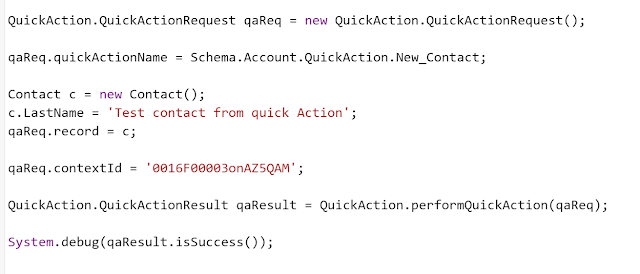
We can execute quick actions from Apex code using the QuickAction class.  Reference:  https://salesforce.stackexchange.com/questions/320915/run-quick-action-from-batch Note: currently only quick actions of type 'Create a record' and 'Update a record' are supported. Attached is the screenshot.

Salesforce Fact #724 | Update related records other than the latest one

Image
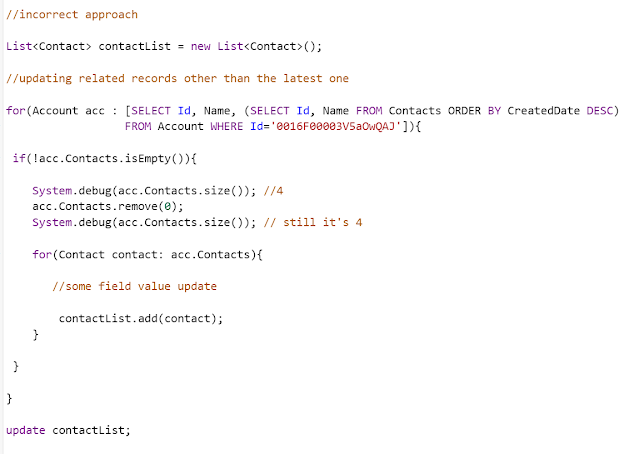
Suppose we have a scenario where we need to update the related records for a parent record other than the latest child record. So, we can use for each loop to iterate over the records after retrieving them in descending order of createddate. Since a collection cannot be modified while being iterated, we need to get the child records collections in a list and then remove the first record, else it would not remove the first child record from the list. Note: The code snippet is only for demonstration purpose. Attached are the screenshots.

Salesforce Fact #701 | Access custom label dynamically in apex

Image
We can now access custom labels in apex dynamically. With Summer'23 release, we have a new System.Label.get() method which returns the translation of a particular custom label for a particular language. Reference:  https://help.salesforce.com/s/articleView?id=release-notes.rn_apex_system_label_methods.htm&release=244&type=5 Note: passing the namespace as blank also returned the same results. Attached are the screenshots.