Posts

Showing posts with the label multiple

Salesforce Fact #996 | SOQL LIKE operator on multiple values

The SOQL LIKE operator can be applied to multiple strings. For this, we can construct a set/list with the values and use that in the SOQL query. This avoids writing LIKE operator for each of the values. Reference:  https://salesforcelynx.medium.com/how-to-use-like-keyword-once-for-multiple-string-comparison-in-a-soql-823020345a3e

Salesforce Fact #835 | Multiple TYPEOF in SOQL query

We can have multiple TYPEOF clause in SOQL query. Example: SELECT     TYPEOF What         WHEN Account THEN Phone         ELSE Name     END,     TYPEOF Who         WHEN Contact THEN Email         ELSE Phone     END  FROM Task

Salesforce Fact #743 | Multiple reset passwords from screen flow

Image
We can create a screen flow for admin users to help them reset passwords for multiple users at once. Also, an invocable apex method is needed. Attached are the screenshots. Note: Each call to System.resetPassword() counts as 1 DML statement.

Salesforce Fact #703 | POC on adding a user to multiple territories using screen flow

Image
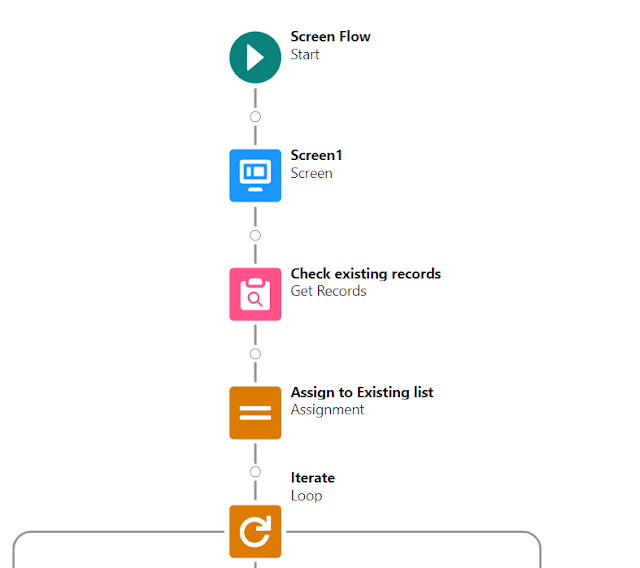
UserTerritory2Association object keeps track of the user assignment to the territories. Let's have an automation leveraging screen flow to let admins add a user to multiple territories in a single go. In this example, we have created a screen flow which takes the userid input and also allows the user to select multiple territories(in this case, it is max 5). Then, we are checking whether the user is already part of the territory, if not we are creating UserTerritory2Association records which eventually adds the user to the selected territories. Note: Since Territory2 object is not supported in UI API, we get an error on selecting the territory but it can be ignored. Attached are the screenshots.

Salesforce Fact #613 | Screen flow: Relate multiple contacts for an account

Image
Many times we need to relate an account with multiple existing contacts. We can create a screen flow with a contact lookup element to achieve this. Attached are the screenshots.