Posts

Showing posts with the label record triggered flow

Salesforce Fact #953 | Limit error in Get Records while using IN operator

Image
We need to be careful while using the IN operator in Get Records element in record-triggered flow. If the text collection is empty, it seems Salesforce runs a query to fetch all the records of that sobject and the number of query rows are counted in the governor limit. So, if the total number of records for that sobject is more than 50000, it throws limit error. Fix would be to always check if the collection is empty or not, before using it in the IN operation. In this example, varIds is an empty text collection used in IN operation to fetch the account records. However, the number of query rows returned is 136 instead of 0, which is the total number of account records in the org. Attached are the screenshots.
Salesforce Fact #886 | Check if account description is blank using flow

Image
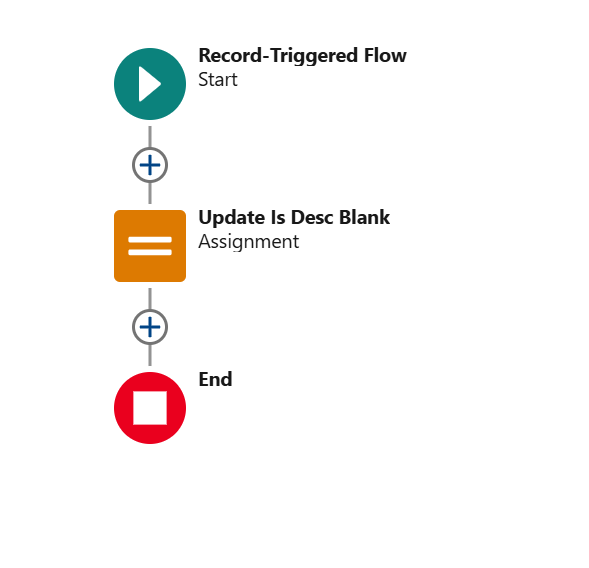
Long text area cannot be referenced in Salesforce formula fields. But they can be referenced in flow formula resources. Suppose, we need a flag to indicate if the description field on account is empty or not. We can create a before save record-triggered flow on Account and check if it is blank in a formula resource and store the value in a checkbox field. Attached are the screenshots.

Salesforce Fact #822 | Validation on case closure

Image
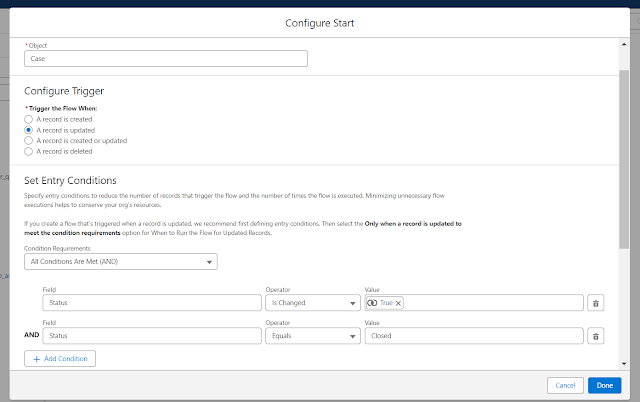
Suppose we want to add a validation that a case can only be closed if the current user is the owner or he is part of the owner queue. We can check the current user id against the owner id or if there is a row present in GroupMember object for this user. The validation be implemented in record-triggered flow using the custom error component. Attached are the screenshots.