Posts

Showing posts with the label SOQL

Salesforce Fact #996 | SOQL LIKE operator on multiple values

The SOQL LIKE operator can be applied to multiple strings. For this, we can construct a set/list with the values and use that in the SOQL query. This avoids writing LIKE operator for each of the values. Reference:  https://salesforcelynx.medium.com/how-to-use-like-keyword-once-for-multiple-string-comparison-in-a-soql-823020345a3e

Salesforce Fact #946 | Constructing dynamic SOQL using dynamic formula evaluation

Image
With Summer'25 release, Dynamic formula evaluation is possible using  FormulaBuilder.parseAsTemplate() method and merge field syntax. This approach can be used to construct Dynamic SOQL queries. In this example, we are trying to fetch Account records which are matching with a Lead ownerid and Leadsource. Reference:  https://developer.salesforce.com/blogs/2025/05/summer25-developers Attached is the screenshot.

Salesforce Fact #938 | SOQL for loop limit error

Image
Have you encountered the error:  System.QueryException: Aggregate query has too many rows for direct assignment, use FOR loop. The error is encountered when SOQL For loop is used on a parent to child SOQL and the child record list contains 200 or more records. To resolve this, we need to run a separate for loop on the child records. Attached are the screenshots.

Salesforce Fact #936 | USING SCOPE delegated in SOQL

There is a SCOPE named 'delegated' in SOQL. It returns the records which have been delegated to some other user. For example, the below queries return the tasks or events which are assigned to different user after the initial assignment. Select Id FROM Task USING SCOPE delegated Select Id FROM Event USING SCOPE delegated Note: the queries return data in context of the previous user.

Salesforce Fact #933 | Query row count for parent to child soql

The query rows count is a bit different in case of SOQL with parent to child subquery. For example, if there are 5 accounts each having 2 contacts in the org, then the below query would return 15 query rows while calling Limits.getQueryRows(): [SELECT Id, (SELECT Id FROM Contacts) FROM Account] i.e. total number of accounts + total number of contacts with related accounts Reference:  https://salesforce.stackexchange.com/questions/184131/what-is-the-limit-for-subquery-in-soql

Salesforce Fact #920 | Query OWD

We can query the OWD of standard and custom objects using EntityDefinition object. The ExternalSharingModel and InternalSharingModel fields refer to the default external and internal access respectively. Sample Query: SELECT DeveloperName, QualifiedApiName, ExternalSharingModel, InternalSharingModel FROM EntityDefinition The possible values are: Private Read -> Public Read Only Edit -> Public Read/Write ControlledByParent ControlledByCampaign

Salesforce Fact #858 | Polymorphic SOQL on ContentDocumentLink

Image
This is how we can use a polymorphic SOQL on ContentDocumentLink LinkedEntity field. Ideally the fields which can be selected comes from a Name Sobject which is relevant when dealing with polymorphic relationship queries. Reference:  https://developer.salesforce.com/docs/atlas.en-us.238.0.object_reference.meta/object_reference/sforce_api_objects_name.htm?_ga=2.114364804.2097756510.1721467571-1754518336.1719649716 Attached is the screenshot.

Salesforce Fact #854 | recalculateFormulas() count towards SOQL query count

Image
We have the recalculateFormulas() function of Formula class which can evaluate the formula without saving the sobject record and this is super helpful in test classes. An interesting thing is, when the sobject record contains all the fields which are needed for the formula evaluation, then Formula.recalculateFormulas() does not count towards the total SOQL query count. But, if the sobject record does not have any of the field which is needed for the formula evaluation, the recalculateFormulas() call is counted as 1 SOQL query. In this example, we have two number fields, Test_Runs and ODI_Runs and a formula field, Total_Runs which is the sum of ODI and Test runs. Reference:  https://developer.salesforce.com/docs/atlas.en-us.apexref.meta/apexref/apex_class_System_Formula.htm#apex_System_Formula_recalculateFormulas Attached are the screenshots.

Salesforce Fact #847 | SOQL INCLUDES with collection

Image
While using SOQL INCLUDES operator with collection, it doesn't support bind expressions. So, the input collection is to be converted to string format and we need to use dynamic SOQL. Reference:  https://salesforce.stackexchange.com/questions/314035/using-collections-in-soql-includes Attached is one sample screenshot.

Salesforce Fact #835 | Multiple TYPEOF in SOQL query

We can have multiple TYPEOF clause in SOQL query. Example: SELECT     TYPEOF What         WHEN Account THEN Phone         ELSE Name     END,     TYPEOF Who         WHEN Contact THEN Email         ELSE Phone     END  FROM Task

Salesforce Fact #833 | SOQL LIKE operator limitation on picklist values

Image
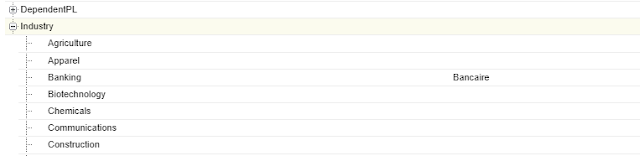
We need to be careful while using the SOQL LIKE operator on picklist values. While using LIKE operator, it considers the translated label instead of the API name of that value. In this example, we have added the translation for the account industry 'Banking' for french language. Now, when the user language is english the LIKE operator works as expected but when the user language is french, the SOQL query does not return any result. Reference:  https://salesforce.stackexchange.com/questions/285076/why-does-the-like-soql-operator-implicitly-translate-picklist-values Attached are the screenshots.

Salesforce Fact #814 | Simplified row returned check on SOQL

Image
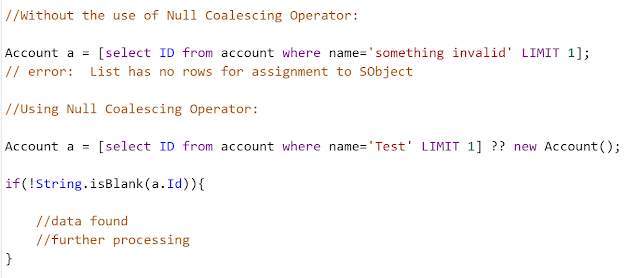
With the advent of the new Null Coalescing operator, the row returned check from SOQL has also been simplified. Previously, if a query is expected to return one row and if it does not return any row we used List collection to avoid the error: 'List has no rows for assignment to SObject'. But now, with Null Coalescing operator we can check it using the sobject variable only, no need of List collection. Attached is the screenshot.

Salesforce Fact #782 | EMPTY_ID in group by

Image
While using GROUP BY in SOQL to find out the count of users corresponding to each role, for the blank role the developername is shown as 'EMPTY_ID'. Attached is the screenshot.

Salesforce Fact #733 | WITH USER_MODE > WITH SECURITY_ENFORCED

What are the advantages of using WITH USER_MODE instead of WITH SECURITY_ENFORCED in SOQL? 1) WITH USER_MODE considers polymorphic fields. 2) WITH USER_MODE processes all clauses of SOQL SELECT statement including the WHERE clause. 3) WITH USER_MODE finds all FLS errors in the SOQL query, where WITH  SECURITY_ENFORCED  returns only the first error. Also,  USER_MODE  provides a method getInaccessibleFields() to check the full set of access errors. Reference:  https://developer.salesforce.com/docs/atlas.en-us.apexcode.meta/apexcode/apex_classes_enforce_usermode.htm

Salesforce Fact #719 | DAY_ONLY() to get records within two dates

Suppose we need to fetch a list of records between two dates and also needs to skip for 2 days within the range. The filter field is of datetime type. We can make use of the DAY_ONLY() function for this. In this example, we are fetching account records created between 2023-07-01 and 2023-07-16 and skip the records created on 2023-07-06, 2023-07-07. SOQL:  SELECT Id, Name, CreatedDate  FROM Account WHERE DAY_ONLY(CREATEDDATE) >= 2023-07-01 AND DAY_ONLY(CREATEDDATE) <= 2023-07-16 AND DAY_ONLY(CREATEDDATE) NOT IN (2023-07-06, 2023-07-07)

Salesforce Fact #716 | Using LIKE operator in dynamic SOQL

Image
How to use LIKE operator in dynamic SOQL? We can use a separate string variable to store the pattern part which includes the symbol '%' and use this as a bind variable or we can use extra single quotes before and after of '%'. Reference:  https://developer.salesforce.com/forums/?id=906F000000093YjIAI Attached is the screenshot.

Salesforce Fact #712 | Dynamic SOQL with multiple AND filters

Image
Suppose we need to construct an SOQL so that it contains multiple AND conditions based on the multiple filter values passed. If a particular filter value is passed only then it will be considered. We can have an apex method to construct the dynamic SOQL considering the possible scenarios. Attached are the screenshots.

Salesforce Fact #699 | Get current app details

How can we get the current app name in apex? we can query UserAppInfo and AppDefinition objects to get the details. The below SOQLs are used to get the details: UserAppInfo userAppInfo = [SELECT Id, AppDefinitionId FROM UserAppInfo WHERE UserId = :UserInfo.getUserId()  ORDER BY LastModifiedDate DESC LIMIT 1]; AppDefinition appDefinition = [SELECT DurableId, Label FROM AppDefinition Where DurableId = :userAppInfo.AppDefinitionId LIMIT 1]; Reference:  https://developer.salesforce.com/forums/?id=9062I000000IDhRQAW

Salesforce Fact #691 | Bind variable with date literals in SOQL

Image
Bind variables cannot be used in SOQL with date literals like 'LAST_N_DAYS' in static context. So as a workaround, we can calculate the date value and then use the same in the SOQL. Reference:  https://salesforce.stackexchange.com/questions/7515/using-soql-apex-bind-variables-for-date-literals-e-g-last-n-days-today-this Attached is the screenshot.

Salesforce Fact #683 | Simple & composite filters

From the perspective of query optimizer, A query filter can be simple or composite. A simple filter is one where each of the field expression in the condition filters uses the 'AND' operator. Whereas, a composite filter is one where two or more field expressions in the condition filters uses the 'OR' operator. Reference:  https://help.salesforce.com/s/articleView?id=000385218&type=1