Posts

Showing posts with the label formatting

Salesforce Fact #977 | Formatted label in screen flow input

Image
In some scenarios, we need to show the screen input element labels as formatted. For example, the label of a text input would be bold. For this, we can create a text template and put the formatted text and then refer this text template resource in the input label. Note: The extra <p> tags needs to be removed else the help text and required icons would get distorted. Attached are the screenshots.
Salesforce Fact #577 | apex:outputText formatting

Image
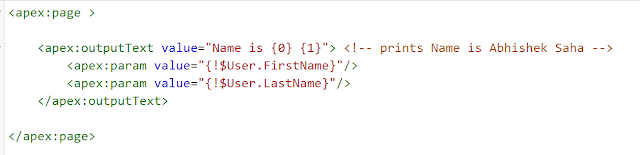
apex:outputText supports value formatting using apex:param tag. Reference:   https://developer.salesforce.com/docs/atlas.en-us.pages.meta/pages/pages_compref_outputText.htm Attached is the screenshot. Note: the <apex:outputText> component doesn't respect the View Encrypted Data Permission for users. To prevent showing sensitive information to unauthorized users, use the <apex:outputField> tag instead.