Posts

Showing posts with the label readOnly

Salesforce Fact #897 | Opportunity Amount is read only

When the Opportunity is associated with one or more Opportunity Products, the amount field is read only. Reference:  https://help.salesforce.com/s/articleView?id=000387134&type=1

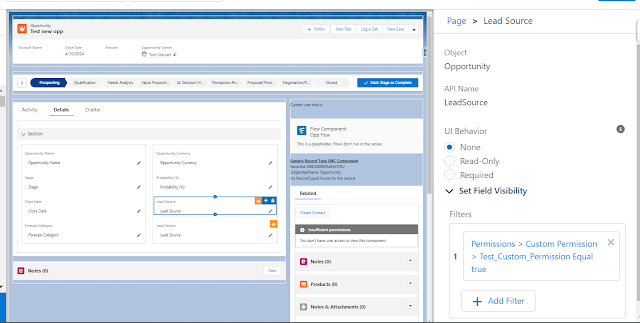
Salesforce Fact #849 | Making field read only using dynamic forms and custom permission access

Image
Another use case of dynamic forms. Suppose, we want to make a field read only for all users and would like to make it editable only if the user is assigned a particular custom permission. We can make use of dynamic forms and take two instances of that field along with the filter conditions accordingly. In this example, we have made the LeadSource field on Opportunity read only for most users and editable only if the user is assigned the 'Test_Custom_Permission'. Note: Admin users will always see the field as editable because of the system permission 'edit read only fields'. Dynamic forms are not supported for community. Attached are the screenshots.

Salesforce Fact #830 | Making field readonly after record creation using field section

Image
Suppose we want to keep a field editable only during the record creation, and once record is created it should be read only in the UI level(for non-admin users). Apart from validation rule, we can make use of field section in lightning app builder to implement the same. In this example, the LeadSource field on opportunity is made read only once it is created by keeping two field instances with two different filters. Note: Field section does not work for community. Attached are the screenshots.

Salesforce Fact #795 | Readonly lightning record picker

Image
Suppose we want to make the lightning-record-picker readOnly once a value is selected. This is how we can implement this, since it does not support disabled or readOnly attributes. Attached is the screenshot.

Salesforce Fact #676 | Get readonly fields in page layout using apex

Image
Using Metadata class methods, we can get the list of fields present in a particular page layout. Suppose we need to find out the list of ReadOnly fields in a page layout, we can get the same using a condition check on  Metadata.UiBehavior enum. It has three values: ' Edit ', ' ReadOnly ' & ' Required '. Reference:  https://salesforce.stackexchange.com/questions/179442/apex-metadata-api-layout-read-only-fields-being-added-as-read-write Attached is the screenshot.

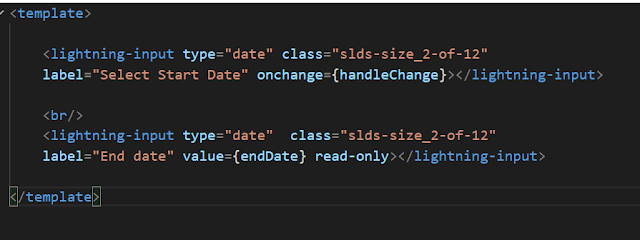
Salesforce Fact #558 | Auto calculate end date LWC

Image
Suppose we have an input date field in LWC which is startdate and can be editable by user. Now, there is another field enddate which would be set to 30 days later the selected start date and it should be read only. We can implement the same using some JS logic. Attached are the screenshots.

Salesforce Fact #551 | readOnly combobox in LWC

Image
Suppose there is a use case to disable a lightning combobox on selection of a particular option. We can implement the same using the 'read-only' attribute. Attached are the screenshots.

Salesforce Fact #7 | Read only

Let's say we have made one custom field read only for a particular profile by checking the read only checkbox in field level security settings in the field security page or by using page layout. But, you found that the field is still editable by the users of the particular profile. The reason might be, we have one system permission in profile settings 'Edit Read Only Fields' which might be enabled either in the profile or in the permission set level. So if this permission is enabled, the read only fields are still editable by the profile users. So, to enforce our intended field security, we have to configure our security settings accordingly considering this particular system permission.