Posts

Showing posts with the label recordId

Salesforce Fact #944 | Getting record id in utility bar LWC

If we have an LWC component in the utility bar, we can get record id in the context of a record detail page. For this, we need to check if CurrentPageReference type is standard__recordPage. Reference:  https://developer.salesforce.com/docs/atlas.en-us.api_console.meta/api_console/sforce_api_console_js_lightning_utility_bar_page_context.htm
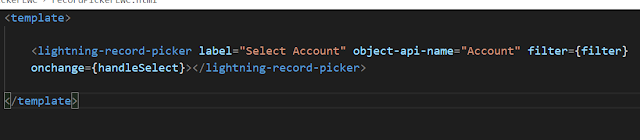
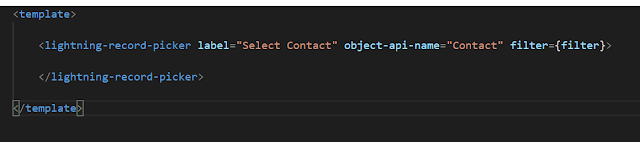
Salesforce Fact #793 | Getting selected recordId in lightning record picker

Image
So, this is how we can access the selected record Id in lightning-record-picker. Attached are the screenshots.

Salesforce Fact #790 | passing value in lightning record picker filter

Image
We can pass value dynamically as well in the filter of lightning-record-picker. For example, suppose we are using a contact record picker and we would like to select only the related contacts for the current account. The LWC is placed in the account record detail page. We can pass the current accountId in the filter. Attached are the screenshots.

Salesforce Fact #752 | Access recordId in LWC screen action

Image
While accessing recordId in LWC screen action in other than @wire method, it shows undefined. To access the recordId value, we need to use currentPageReference. Reference:  https://salesforce.stackexchange.com/questions/344045/recordid-is-undefined-in-lwc-quick-action-component Attached is the screenshot.

Salesforce Fact #643 | Passing recordId from LWC quick action

Image
Suppose we are using an LWC as a quick action and from that component we are passing the current record Id to a child LWC for further processing. Now, an interesting thing here is  if we are calling an apex method imperatively from the child component using the same recordId passed, th en we need to check the value of it before passing, otherwise it passes undefined. Attached are the screenshots.

Salesforce Fact #554 | Record Id in success message

If you are seeing the record Id in record created success message instead of the record name, that means the auto number record name field is not added in the layout. You need to add it in the page layout. Reference:  https://help.salesforce.com/s/articleView?id=000389059&type=1

Salesforce Fact #553 | Using same screen flow as quick action and list view action

Image
Suppose we have a screen flow which needs to be used as both quick action and list view action for the same Sobject. We need to create two actions, one is quick action and another is list view button. In order to distinguish the context, we can make use of the 'ids' and 'recordId' variables. Both the variables are available for input and when the screen flow is called from quick action, ids is blank and recordId has the recordId. When it is called from the list view button, recordId is blank and ids holds the selected record Ids. Attached are the screenshots.

Salesforce Fact #8 | pass entire record to flow

Besides passing the record Id, we can also pass the entire Sobject record to the flow from the record detail page. Let's say we have a flow in the Account record detail page and we want to pass the entire record to the flow. To do this, 1. Create one record variable in flow say accountRec and select the checkbox for Available for input. 2. After creating the flow, activate it. 3. While adding the flow in the record detail page using lightning app builder, an option will be given ('Pass all field values from the record into this flow variable') to populate the flow variable with the record. Select the option. 4. Now the record is available in the flow and we can access the fields like: {!accountRec.Industry} / {!accountRec.Name} etc.

Salesforce Fact #4 | Pass record id to flow

How to pass recordId from the record detail page to flow? Let's say we have a flow in the record detail page and we want to pass the id of the record to the flow. To do this, 1. Create one text variable in flow say inputRecordId and select the checkbox for Available for input. 2. After creating the flow, activate it. 3. While adding the flow in the record detail page using lightning app builder, an option will be given ('pass record ID into this variable') to populate the flow variable with the record ID. Select the option. 4. Now the record id is available in the flow.