Posts

Showing posts with the label date

Salesforce Fact #961 | 1st monday and last friday validation in screen flow

Image
We can implement a validation in screen flow using the formula resource to select a date other than the first monday and last friday of the month. Attached are the screenshots.

Salesforce Fact #960 | 2nd or 4th saturday validation in screen flow

Image
We can implement a validation in screen flow using the formula resource to select a date other than the 2nd or 4th saturday of the month. Attached are the screenshots.

Salesforce Fact #909 | Editable date column in lightning datatable

Image
In lightning datatable, if we have a date format editable column we can use the type as 'date' or 'date-local'. If we use 'date' the editable window shows the time part also, using 'date-local' shows only date part. Reference:  https://developer.salesforce.com/docs/component-library/bundle/lightning-datatable/documentation Attached are the screenshots.

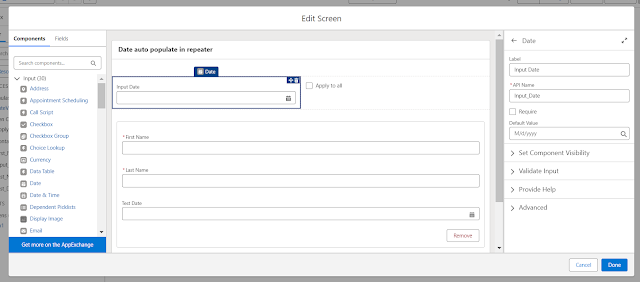
Salesforce Fact #820 | Auto populate date in repeater component in screen flow

Image
Suppose we have a use case in screen flow where we need to autopopulate some date input based on the user choice in all the instances of the repeater component. So, we can have a checkbox 'apply to all' along with a date type input. Once the checkbox is selected, the input date will get populated automatically in repeater instances. Thanks to the screen reactivity support of Repeater(Beta) which avoids manually changing the date in each of the repeater instances. Attached are the screenshots.

Salesforce Fact #719 | DAY_ONLY() to get records within two dates

Suppose we need to fetch a list of records between two dates and also needs to skip for 2 days within the range. The filter field is of datetime type. We can make use of the DAY_ONLY() function for this. In this example, we are fetching account records created between 2023-07-01 and 2023-07-16 and skip the records created on 2023-07-06, 2023-07-07. SOQL:  SELECT Id, Name, CreatedDate  FROM Account WHERE DAY_ONLY(CREATEDDATE) >= 2023-07-01 AND DAY_ONLY(CREATEDDATE) <= 2023-07-16 AND DAY_ONLY(CREATEDDATE) NOT IN (2023-07-06, 2023-07-07)

Salesforce Fact #568 | Format date using RIGHT()

Image
Suppose there is a date field in the object and we want to format the date value to DD.MM.YYYY format. And also prefix 0 is to be considered for Day < 10 and also for Month  < 10.  Now, we can use IF check to implement this. However, we can append '0' and use RIGHT() function to get the result in a bit simpler way. Attached are the screenshots.