Posts

Showing posts with the label delete

Salesforce Fact #989 | New delete files permission

Image
There's a new app permission 'Delete Salesforce Files' has been introduced in Spring'26. It can be assigned using a profile or permission set. This allows the users to delete accessible files irrespective of the ownership. The app permission can be checked in LWC as well similar to other app permissions. Attached is the screenshot. Reference:  https://help.salesforce.com/s/articleView?id=release-notes.rn_experiences_files_delete_files.htm&release=260&type=5 However, there seems to be one issue; With this permission, a user can delete a file with only view access to the file. Hope Salesforce will put further restriction to fix this in upcoming releases.
Salesforce Fact #952 | Delete debug level

Steps to delete debug level: Go to classic -> setup -> Under Monitor -> Logs -> Debug levels -> select the debug level -> delete. Reference:  https://stackoverflow.com/questions/73911362/salesforce-debug-levels-need-to-edit-or-delete-existing-level

Salesforce Fact #807 | Mass delete records

There is an option in Salesforce which allows to mass delete records. Currently it is available for these objects: Accounts, Leads, Activities, Contacts, Cases, Solutions, Products, Reports. Steps: Setup -> Mass Delete Records -> Choose the object as per the need. Reference:  https://help.salesforce.com/s/articleView?id=sf.admin_massdelete.htm&type=5

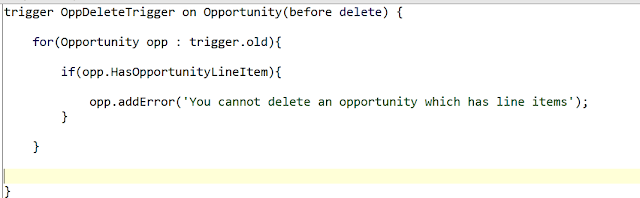
Salesforce Fact #634 | Validation on opportunity deletion

Image
Suppose we need to keep a validation on Opportunity, an opportunity cannot be deleted if it has existing line items. We can make use of the HasOpportunityLineItem field in trigger. Attached is the screenshot. Note: The code snippet is only for demonstration purpose and apex best practices have not been covered.

Salesforce Fact #620 | Access share object records in trigger

Image
While changing the record owner, the sharing records with RowCause='Manual' gets deleted. If we want to access the records for some processing, we need to get them in before update context. In this example, we have an account record with two manual share records. Now, in case of before update we get correct data from the AccountShare table, in after update the records have been deleted. Attached are the screenshots. Note: The code snippet is only for demonstration purpose and coding best practices have not been covered.

Salesforce Fact #599 | Deleting CaseComment records

Image
While deleting CaseComment records, recordIds won't work with Database.delete() DML statement. We need to specify as single or list of sobject records. Reference:  https://developer.salesforce.com/docs/atlas.en-us.object_reference.meta/object_reference/sforce_api_objects_casecomment.htm Attached is the screenshot.

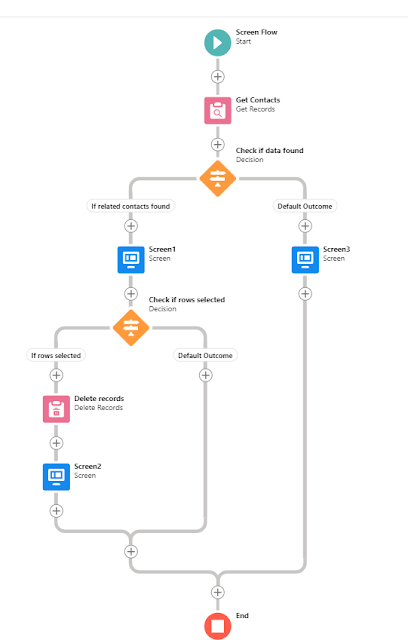
Salesforce Fact #570 | Delete selected related records using screen flow datatable

Image
With the new datatable feature in screen flow, we can create an automation to selectively delete related records from the parent record. In this example, we are showing the related contacts in the datatable inside screen flow and the user can choose and delete particular contact records. The flow is invoked as quick action from the account record detail page. Note: This will work fine when the number of related records are not very high, else this will encounter limit errors. Attached are the screenshots.