Posts

Salesforce Fact #667 | Get current session Id

If we use System.debug() to get the current session Id, it shows SESSION_ID_REMOVED.  So, in order to get the SessionId we can use a bit of apex logic as below: System.debug(UserInfo.getOrganizationId()+''+UserInfo.getSessionId().substring(15)); Note: The first 15 char of session Id is the Organization Id. Reference:  https://developer.salesforce.com/forums/?id=9062I000000g6v7QAA

Salesforce Fact #666 | Picklist api value with single quote

Image
Suppose we have a picklist field value whose api name contains single quote like the value: Partner's Account. In order to import the data correctly in this field, we need to wrap the value inside double quotes like "Partner's Account". Attached are the screenshots.

Salesforce Fact #665 | Dynamic maxrow selection in screen flow datatable

Image
We have a Data Table component type in screen flow. While configuring the row selection for a Data Table, if the Row selection mode is 'Multiple' we can set the min and max row selection values. Suppose, we want to keep the max row selection value dynamic i.e. it will be based on the length of the source collection and we want to allow the user to select the max number of rows which is equal to length of collection - 1. For this, we can take a number type resource and set its value with the length of the collection and use that one in the maximum selection section. Attached are the screenshots.

Salesforce Fact #664 | Case accountId & contactId auto populate in community

When creating a case from a community user, the ContactId is auto-populated with the contact associated with the logged in community user. The AccountId field is also auto-populated with the related account record.

Salesforce Fact #663 | Bulk API job states

Below are the Bulk API Job states: 1. Open: The job has been created. 2. UploadComplete: The data has been uploaded to the job. 3. InProgress: The job is being processed by Salesforce. 4. Aborted: The job has been aborted. 5. JobComplete: The job has been processed by Salesforce. 6. Failed: Some records in the job got failed. Reference:  https://developer.salesforce.com/docs/atlas.en-us.api_asynch.meta/api_asynch/get_job_info.htm

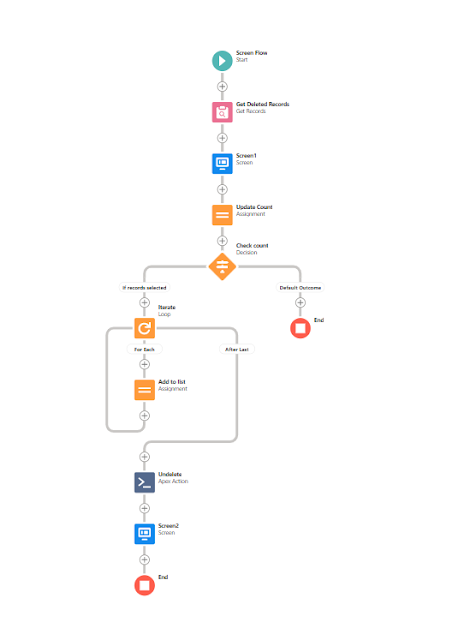
Salesforce Fact #662 | Undelete multiple records using screen flow datatable

Image
We can make use of the datatable type in screenflow to undelete multiple selected records. Suppose, we want to show the records deleted by the user today and provide a way to undelete multiple records. We can create an apex class with an invocable method while performs the undeleted on the selected record Ids. Attached are the screenshots.

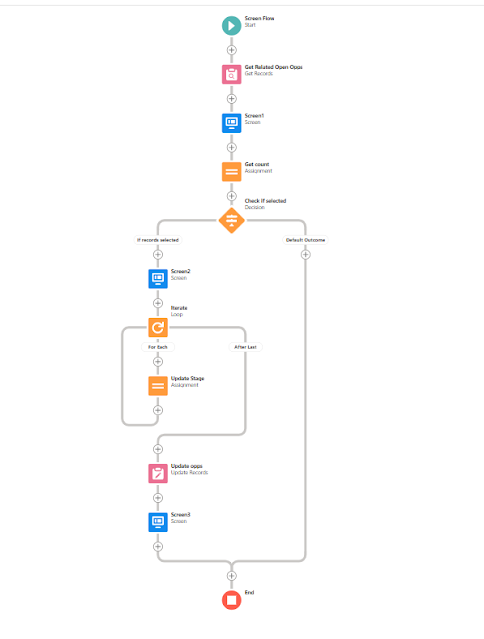
Salesforce Fact #661 | Close related opportunities from screen flow

Image
We can create a screen flow to mark the related opportunities as closed won/lost from the account detail page. Attached are the screenshots.