Posts

Salesforce Fact #735 | Push count field

There is a field named 'PushCount' in Opportunity object. It keeps track of the number of times the close date of the opportunity is updated with atleast one month difference. In order to enable this field, Go to Setup -> Opportunity Settings -> Select 'Make the Push Count field available' -> Save Reference:  https://developer.salesforce.com/docs/atlas.en-us.object_reference.meta/object_reference/sforce_api_objects_opportunity.htm

Salesforce Fact #734 | Prompt users to add opportunity products

There is a setting under Setup -> Opportunity Settings ->  ' Prompt users to add products to opportunities '  which enables a prompt to the user to add products to the opportunity once it is created.

Salesforce Fact #733 | WITH USER_MODE > WITH SECURITY_ENFORCED

What are the advantages of using WITH USER_MODE instead of WITH SECURITY_ENFORCED in SOQL? 1) WITH USER_MODE considers polymorphic fields. 2) WITH USER_MODE processes all clauses of SOQL SELECT statement including the WHERE clause. 3) WITH USER_MODE finds all FLS errors in the SOQL query, where WITH  SECURITY_ENFORCED  returns only the first error. Also,  USER_MODE  provides a method getInaccessibleFields() to check the full set of access errors. Reference:  https://developer.salesforce.com/docs/atlas.en-us.apexcode.meta/apexcode/apex_classes_enforce_usermode.htm

Salesforce Fact #732 | Show image in flow send email

Image
How to show image in the email sent from flow Send Email action? Here are the steps to follow: Upload the image in the Documents -> Select the checkbox 'Externally Available Image' -> Right click and open the image in a new tab and copy the url -> Use the same in the flow text template. Attached are the screenshots.

Salesforce Fact #731 | Login as experience user permission

The permissions needed to login as a partner or customer user are: 1) Manage external users or Manage partner users 2) Edit on the Account record Reference:  https://help.salesforce.com/s/articleView?id=sf.networks_create_external_users.htm&type=5

Salesforce Fact #730 | POC on HTTP callout from screen flow

Image
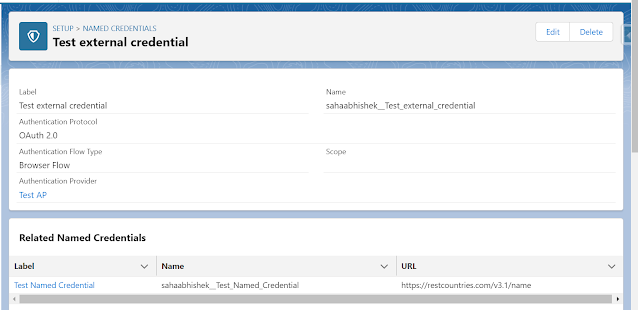
Now we can do HTTP callout from flow. Currently the supported methods are GET and POST(Beta). In this example, we are doing a callout from screen flow to get the capital of the selected country. The endpoint is: https://restcountries.com/v3.1/name/{countryName}?fields=capital Reference:  https://www.apexhours.com/http-callout-into-flow-builder-without-code/ Attached are the screenshots.                                                External  Credential   Named Credential   Permission Set  Screen Flow

Salesforce Fact #729 | LWC getRecords in screen flow

Image
Suppose we have a lookup component in the screen flow which allows selecting multiple accounts. Now, we have a requirement to get the data of the selected accounts. We can get that using an LWC which makes use of getRecords wire method to fetch the required data and display in the UI. References:  https://developer.salesforce.com/docs/platform/lwc/guide/reference-wire-adapters-records.html https://dev.to/tdrnk/lwc-getrecords-wire-adapter-how-to-retrieve-records-dynamically-apd Note: The LWC UI styling can further be improved. It is just for demonstration purpose. Attached are the screenshots.