Posts

Salesforce Fact #750 | Multi-currency facts

Image
How to check if the current org is multi-currency enabled? There is a method called isMultiCurrencyOrganization() of UserInfo class which returns true or false accordingly. What is Parenthetical Currency Conversion? In multi-currency enabled orgs, Salesforce displays converted currency amounts in parentheses if the user's personal currency is different from the record's currency. The converted currency amount is considered as secondary and is shown in parentheses whereas the record's currency amount is shown in first place. In the attached screenshot, The record's currency is BRL and the user's personal currency is EUR. Reference:  https://help.salesforce.com/s/articleView?id=sf.admin_enable_multicurrency_implications.htm&type=5
Salesforce Fact #749 | Empty key Id in Salesforce

Image
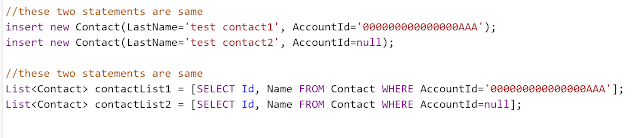
There is an empty key Id in Salesforce and the id is ' 000000000000000AAA'. This is equivalent to NULL or no-reference to parent record. This can be used in place of NULL while updating records via data loader without enabling the 'insert null values' setting. Reference:  http://www.fishofprey.com/2011/06/salesforce-empty-key-id.html Attached is one screenshot.

Salesforce Fact #748 | Screen reactivity on input placeholder

Image
Screen reactivity feature works perfectly on input placeholder attribute as well. In this example, we are updating the placeholder text based on the selected account name from the lookup. Attached are the screenshots.

Salesforce Fact #747 | Pass selected record from LWC datatable to screen flow

Image
Suppose we have a lightning-datatable in LWC and we want to pass the selected record data to the screen flow and show the field values in different inputs. We can do that using lightning/flowSupport in LWC. References:  https://automationchampion.com/2023/07/17/pass-data-from-lightning-web-component-to-screen-flow-3/ https://salesforce.stackexchange.com/questions/370321/passing-selected-datatable-rows-to-flow-collection-inside-of-a-screen-flow Attached are the screenshots. Note: Screen reactivity option is to be enabled in Process Automation Settings

Salesforce Fact #746 | lwc:else is optional

Image
Just like most of the programming languages, lwc:else is optional even if we are using lwc:elseif. In this example, we want to show data if the user is assigned either custom permission1 or custom permission2, but we don't want to show anything otherwise. For more details, check out:  https://developer.salesforce.com/docs/platform/lwc/guide/create-conditional.html Attached are the screenshots.

Salesforce Fact #745 | Aloha feature

There is a feature called 'Aloha' in Salesforce.  Once a package is passed the AppExchange security review process, limits such as number of tabs/custom objects are bypassed. The package would still get installed even if the installation org has reached any of those limits. This is referred to as Aloha.

Salesforce Fact #744 | Named credential error

Have you encountered this error: 'The callout couldn't access the endpoint, You might not have the required permissions or the named credential <Named Credential name> does not exist'. One of the reason could be the user doesn't have access to the 'User External Credentials' object. To resolve this, provide Read access to the user on this object. Reference:  https://salesforce.stackexchange.com/questions/398401/named-credential-not-accessible-by-non-system-admin-profiles